
Subaru Outback (BR): Driver’s side power window switches
Subaru Outback (BR) 2010-2015 Owners Manual / Keys and doors / Windows / Power window operation by driver / Driver’s side power window switches
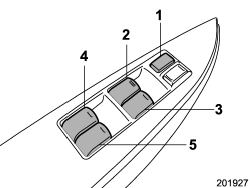
1) Lock switch
2) For driver’s window
3) For front passenger’s window
4) For rear left passenger’s window
5) For rear right passenger’s window
All door windows can be controlled by the power window switch cluster at the driver side door.
READ NEXT:
 Operating the driver’s window
1) Automatically open/close
2) Open/close
To open:
Press the switch down lightly and hold it. The window will open as long as the
switch is held.
This switch also has a one-touch auto down fun
Anti-entrapment function
CAUTION
● Never attempt to test this function using fingers, hands or other parts of
your body.
● The anti-entrapment function may not operate properly if some object gets trapped
ju
Operating the passengers’ windows
To open:
Press the appropriate switch down and hold it until the window reaches the desired
position.
To close:
Pull the switch up and hold it until the window reaches the desired position.
SEE MORE:
DTC E2, E3, E4, E6, E7, E8, E9, EA, EB, EC, ED, EE, F1, F2, F3, F4, F5, F6
BV:DTC E2 FRONT SENSOR BUS RH COMMUNICATION ERROR
NOTE:
Refer to DTC E4 for details on DTC E2. <Ref. to AB(diag)-175, DTC E4 FRONT
SENSOR BUS RH COMMUNICATION
ERROR, Diagnostic Chart with Trouble Code.>
BW:DTC E3 FRONT SENSOR BUS RH COMMUNICATION ERROR
NOTE:
Be sure to properly identify the A
Pressure Sensor
A: INSPECTION
1) Perform a diagnosis code (DTC) check by connecting the Subaru Select
Monitor.
2) If any diagnosis code (DTC) is displayed, refer to "List of Diagnostic
Trouble Code (DTC)" in "HVAC SYSTEM
(DIAGNOSTICS)" section. <Ref. to AC(diag)-53, LIST, List of Diagnostic Trouble
Code (DTC
© 2010-2026 Copyright www.suoutback.com
