
Subaru Outback (BR): Seek tuning (SEEK)
Subaru Outback (BR) 2010-2015 Owners Manual / Audio / FM/AM radio operation / Tuning / Seek tuning (SEEK)
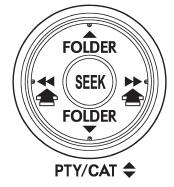
If you press the “ ” or “
 ”
”
side of the “SEEK” button briefly, the radio will automatically search for a receivable
station and stop at the first one it finds. This function may not be available,
however, when radio signals are weak. In such a situation, perform manual tuning
to select the desired station.
READ NEXT:
 Scan tuning (SCAN)
If you press the “SCAN” button, the radio will switch to the scan mode. In this
mode, the radio scans through the radio band until a station is found. The radio
will stop at the station for
PTY (Program type) group tuning (only FM reception)
Press the “PTY/CAT” button to change to the PTY selection mode. At this time,
the PTY group that you are currently listening to will be displayed for 10 seconds.
In PTY selection mode, “PT
RDS text display
If the PS (Program Service Name) and/or RT (Radio Text) are available, pressing
the “TEXT” button changes the display among PS, RT and frequency. The initial setting
is “PS”.
NOTE
`
SEE MORE:
Key number
1) Key number plate
2) Security ID plate
The key number is stamped on the key number plate attached to the key set.
Write down the key number and keep it in another safe place, not in the vehicle.
This number is needed to make a replacement key if you lose your key or lock it
inside the veh
Rear Axle
A: REMOVAL
1) Lift up the vehicle, and then remove the rear wheels.
2) Remove the axle nut.
CAUTION:
Do not loosen the axle nut while the rear axle is loaded. Doing so may damage
the hub bearing.
Lift the crimped section of axle nut.
Remove the axle nut using a socket wrench while depressing th
© 2010-2026 Copyright www.suoutback.com
