
Subaru Outback (BR): AUTO button
FULL AUTO mode operation:
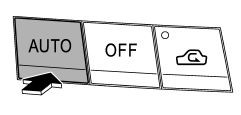
When the “AUTO” button is pressed, the indicator light “FULL AUTO” on the display illuminates. In this state, fan speed, airflow distribution, air-inlet control, and air conditioner compressor operation are automatically controlled.
AUTO mode operation:
If you operate any of the buttons on the control panel other than the “OFF” button, rear window defogger button and temperature control buttons during FULL AUTO mode operation, the indicator light “FULL” on the control panel will turn off and the indicator light “AUTO” will remain illuminated. You can then manually control the system as desired using the button you operated. To change the system back to the FULL AUTO mode, press the “AUTO” button.
READ NEXT:
 OFF button
The automatic climate control system turns off (the air conditioner compressor
and fan turn off) when the “OFF” button is pressed.
When the “OFF” button is pressed, the outside air circul
Temperature control button
Driver’s side
Passenger’s side
To increase the temperature setting, press the “”
side of the temperature control button. To decrease the temperature setting, press
the “” side of
Defroster button
To defrost or dehumidify the windshield
and front door windows, press the defroster button “”.
When the “” button is pressed, the
air conditioner compressor automatically operates to
SEE MORE:
Seatbelt maintenance
To clean the seatbelts, use a mild soap and lukewarm water. Never bleach or dye
the belts because this could seriously affect their strength.
Inspect the seatbelts and attachments including the webbing and all hardware
periodically for cracks, cuts, gashes, tears, damage, loose bolts or worn ar
Drive Pinion Shaft Assembly in Automatic Transmission
A: REMOVAL
1) Remove the transmission assembly from the vehicle.
<Ref. to 5AT-37, REMOVAL, Automatic Transmission Assembly.>
2) Pull out the torque converter assembly. <Ref. to 5AT-63, REMOVAL, Torque Converter Assembly.>
3) Remove the transmission harness connector from stay.
4) Re
© 2010-2026 Copyright www.suoutback.com
