
Subaru Outback (BR): Automatic climate Control panel
Subaru Outback (BR) 2010-2015 Owners Manual / Climate control / Automatic climate control system (if equipped) / Automatic climate Control panel
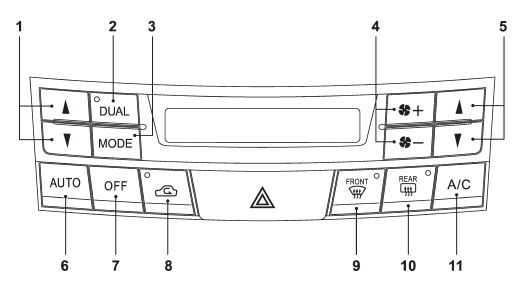
1) Temperature control button (driver’s side) 2) Dual mode button
3) Airflow mode selection button 4) Fan speed control button 5) Temperature control button (front passenger’s side) 6) AUTO button
7) OFF button
8) Air inlet selection button 9) Defroster button
10) Rear window defogger button (Refer to “Defogger and deicer” F3-34.) 11) Air conditioner button
- AUTO button
- OFF button
- Temperature control button
- Defroster button
- Fan speed control button
- A/C – Air conditioner button
- Airflow mode selection button
- Air inlet selection button (Automatic climate control system)
READ NEXT:
 AUTO button
FULL AUTO mode operation:
When the “AUTO” button is pressed, the indicator light “FULL AUTO” on the display
illuminates. In this state, fan speed, airflow distribution, air-inlet control,
OFF button
The automatic climate control system turns off (the air conditioner compressor
and fan turn off) when the “OFF” button is pressed.
When the “OFF” button is pressed, the outside air circul
Temperature control button
Driver’s side
Passenger’s side
To increase the temperature setting, press the “”
side of the temperature control button. To decrease the temperature setting, press
the “” side of
SEE MORE:
Ignition switch light
For easy access to the ignition switch in the dark, the ignition switch light
illuminates when driver’s door is opened or when the driver’s door is unlocked using
the remote keyless entry transmitter.
The light remains illuminated for approximately 30 seconds and gradually turns
off under
Conditions in which front passenger’s SRS frontal airbag is activated
The front passenger’s SRS frontal airbag will be activated for deployment upon
impact when any of the following conditions is met regarding the front passenger’s
seat.
● When the seat is occupied by an adult.
● When a heavy article is placed on the seat.
When the front passeng
© 2010-2026 Copyright www.suoutback.com
